Posts filed under ‘PhotoStage’
Carine photoshoot
The other day Carine came by and asked me to take a few photos of her. These are some samples.
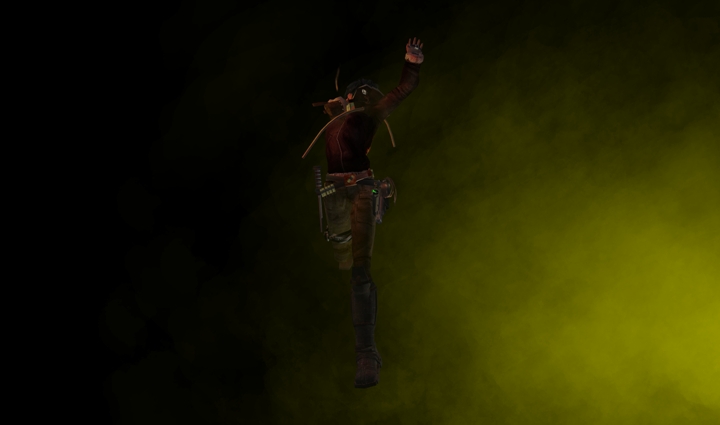


For the first two I set the PhotoStage backdrop to black, placed a warming light to her right and a white filling light to her left and above. Then I set up an effects generator to coloured fog. For the third picture I used a wood texture for the backdrop and a third soft light placed near Carine’s feet to avoid deep shadows under her chin.
I shot at 2880 x 1700 (twice my screen resolution). The photos here are resized to 25% of their original size, and compressed as JPGs.
Thanks, Carine, for letting me show these pics here!
PhotoStage update available now
PhotoStage 1.0.6 is now available. This is an “emergency” update that works around the problems introduced by yesterday’s rolling restart. No functionality changes have been made.
Current owners of PhotoStage can get the update automatically by clicking the Reset button on the PhotoStage main menu. The new version will be dispatched to you after a few seconds.
The new version is also available from all our retail points, both web and inworld.
Important: please don’t forget to transfer any backdrop textures and saved configurations to the new version of PhotoStage before you delete the old one.
SL glitch affecting PhotoStage
It seems that the fixes that Linden Lab applied to SL servers during yesterday’s rolling restart have introduced a number of problems. The official Linden Blog reports so (http://blog.secondlife.com/2008/02/01/fix-may-cause-problems-for-scripts-relying-on-long-object-names-and-descriptions/).
A few minutes ago we detected that these problems can affect the correct functioning of PhotoStage, and immediately contacted Linden Lab via customer support requesting more information and, ideally, a fix. We are also investigating a workaround to make PhotoStage function correctly even if Linden Lab don’t fix these problems. We will make a PhotoStage update available as soon as we can. We will send a new group notice once it’s ready with specific instructions on how to obtain it.
In the meantime, we apologise for the inconvenience, and we hope that you understand that this is a problem introduced by Linden Lab and there is not much that we can do to avoid it.
Gaze points for PhotoStage
In addition to the new features in PhotoStage 1.1 (coming soon) that we descibed recently, we have decided to add one more. Sometimes, when you are taking photos of a model, you would like that she looks in a certain direction. A gaze point is just an object that you can create and ask your model to track with her gaze by “alt-clicking”. This way, the model’s gaze and possibly head position will move, always pointing towards the gaze point, when you move it around.
We hope you find this useful. As usual, your feedback is welcome.
Tutorial: Lights and effects basics
In this second tutorials post I explain the basics of lights and effects. This is valid for PhotoStage and PhotoLite as well.
First, some definitions. A light is just an object that emits light. You can have up to six of them with either PhotoStage or PhotoLite. Lights allow you to illuminate your subject using what SL calls “local lighting”, i.e. light cast by prims with the light flag active, as opposed to “environment light” which comes from the sun and moon. As you surely know, light is the essence of a photograph, so a fine control of lights is crucial to achieve great results.
PhotoStage update coming soon
We are working hard on the next version of PhotoStage. After having received great feedback from many customers, we decided to incorporate a few enhancements that will be included in version 1.1, to be released soon. If you are an owner of PhotoStage you will receive this update for free.
In addition to lots of minor improvements and optimisations, these are the major new features in the upcoming version:
-
A HUD will make using the PhotoStage much more enjoyable. You will be able to avoid menus except for a few uncommon commands.
-
A Channel setting will let you operate up to 9 different PhotoStages from a single Control Box or HUD. This is especially useful if you want to set up multiple PhotoStages side by side.
-
An Update button will be added to the menus, so you can check for updates manually without resetting the whole PhotoStage.
-
A few top-class modelling poses will be included with the PhotoStand.
We hope you enjoy these improvements. As usual, your feedback is crucial for us to make the best studio photography toolkit in SL. Let us know what you think!
Custom PhotoStage backdrops
Some customers have suggested that the standard PhotoStage backdrops (16 and 12 metres) are too large for them. The good news is that we can provide custom-sized backdrops, from very tiny to very large. So, if you have space limitations and still want to use PhotoStage, or if you want an especially big backdrop, let us know and we will build it for you. Contact us and we will give you a quote that will vary depending on the required size and delivery timeframe.
Tutorial: Using the PhotoStage backdrop
A few PhotoStage users have suggested that a post series containing short tutorials explaining how to use PhotoStage would be good. I think that’s a great idea, so here I am starting. Most of the material that I will go through can be found in the User’s Manual, so don’t forget that this is a good source of information.
I assume that you know how to touch the control box to obtain the main menu. The control box is that orange cube that comes with the PhotoStage, and which often sits next to the backdrop.
Today I will examine the PhotoStage backdrop, that large curved surface against which you often photograph your model. When you rez (or reset) your PhotoStage, the backdrop is plain grey. You can change three things about it: colour, texture and brightness, which are, precisely, the three options that you see if you click the Backdrop button on the main menu.
People are posting about the PhotoStage
It’s only two days after we released the PhotoStage, and people are already posting about it. See some comments:
- Helix Rehula: “Hello PhotoStage …goodbye PhotoSphere” (in Spanish)
- Serenity Mercier: “definitely worth checking out for anyone serious about Second Life photography”
What do you think? Let us know!
 Ananké Media Systems